find_shortest_path
- pyhelpers.geom.find_shortest_path(points_sequence, ret_dist=False, as_geom=False, **kwargs)[source]
Finds the shortest path through a sequence of points.
This function constructs a graph where each point is connected to its two nearest neighbors and then uses Depth-First Search (DFS) starting from every point to find the lowest-cost path among those traversals. The method is quick but yields only an approximate solution.
- Parameters:
points_sequence (numpy.ndarray | list | Iterable) – Sequence of points, typically a 2D array or list of coordinates (e.g.
[[lon, lat], ...]).ret_dist (bool) – Whether to return the path distance (sum of edge lengths) as the second element of a tuple; defaults to
False.as_geom (bool) – Whether to return the sorted path as a
shapely.geometry.LineStringobject (requires shapely); defaults toFalse.kwargs – [Optional] Additional parameters for the class sklearn.neighbors.NearestNeighbors, such as
metric(e.g.'euclidean','haversine').
- Returns:
The sorted path sequence (numpy.ndarray), optionally wrapped in a
shapely.geometry.LineStringor a tuple with the distance.- Return type:
numpy.ndarray | shapely.geometry.LineString | tuple[numpy.ndarray | shapely.geometry.LineString, float]
The original method using 2-Nearest Neighbors and DFS is a Greedy Heuristic. For $N > 4$ points, this method rarely finds the mathematically shortest path (optimal TSP-P solution) because the 2-NN graph may contain local cycles or may not be fully connected, preventing DFS from discovering the optimal global order.
Examples:
>>> from pyhelpers.geom import find_shortest_path
>>> from pyhelpers._cache import example_dataframe
>>> example_df = example_dataframe()
>>> example_df
            Longitude   Latitude
City
London      -0.127647  51.507322
Birmingham  -1.902691  52.479699
Manchester  -2.245115  53.479489
Leeds       -1.543794  53.797418
>>> example_df_ = example_df.sample(frac=1, random_state=1)
>>> example_df_
            Longitude   Latitude
City
Leeds       -1.543794  53.797418
Manchester  -2.245115  53.479489
London      -0.127647  51.507322
Birmingham  -1.902691  52.479699
>>> cities = example_df_.to_numpy()
>>> cities
array([[-1.5437941, 53.7974185],
       [-2.2451148, 53.4794892],
       [-0.1276474, 51.5073219],
       [-1.9026911, 52.4796992]])
>>> cities_sorted = find_shortest_path(points_sequence=cities)
>>> cities_sorted
array([[-1.5437941, 53.7974185],
       [-2.2451148, 53.4794892],
       [-1.9026911, 52.4796992],
       [-0.1276474, 51.5073219]])
This example is illustrated below (see Figure 12):
>>> import matplotlib.pyplot as plt
>>> import matplotlib.gridspec as mgs
>>> from pyhelpers.settings import mpl_preferences
>>> mpl_preferences(backend='TkAgg')
>>> fig = plt.figure(figsize=(7, 5))
>>> gs = mgs.GridSpec(1, 2, figure=fig)
>>> ax1 = fig.add_subplot(gs[:, 0])
>>> ax1.plot(cities[:, 0], cities[:, 1], label='original')
>>> for city, i, lonlat in zip(example_df_.index, range(len(cities)), cities):
...     ax1.scatter(lonlat[0], lonlat[1])
...     ax1.annotate(city + f' ({i})', xy=lonlat + 0.05)
>>> ax1.legend(loc=3)
>>> ax2 = fig.add_subplot(gs[:, 1])
>>> ax2.plot(cities_sorted[:, 0], cities_sorted[:, 1], label='sorted', color='orange')
>>> for city, i, lonlat in zip(example_df.index[::-1], range(len(cities)), cities_sorted):
...     ax2.scatter(lonlat[0], lonlat[1])
...     ax2.annotate(city + f' ({i})', xy=lonlat + 0.05)
>>> ax2.legend(loc=3)
>>> fig.tight_layout()
>>> fig.show()
>>> # from pyhelpers.store import save_figure
>>> # path_to_fig_ = "docs/source/_images/geom-find_shortest_path-demo"
>>> # save_figure(fig, f"{path_to_fig_}.svg", verbose=True)
>>> # save_figure(fig, f"{path_to_fig_}.pdf", verbose=True)
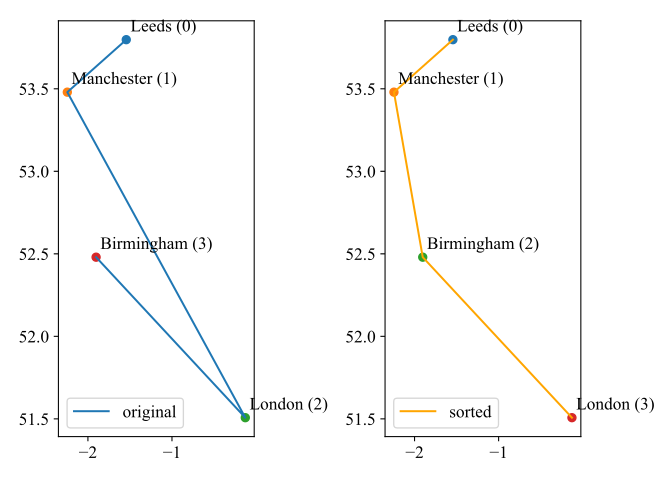
Figure 12 An example of sorting a sequence of points given the shortest path.